
On:

Introduction
When I first started working with STC. The integration team had a desktop java application for testing web services. it supported wide range of protocols and services such as SOAP and REST as well as very platform specific such as IBM webmthods pipeline request. Tester can test and saves test cases in the database for other to use or learn from. It was very versatile. Then Covid happened. Everyone was forced to work from home. The VPN that was provided was very limited to few servers and fewer ports. Testing became a hassle with multiple port forwarding and juggling multiple ssh sessions. The team weren’t ready to for this change to say the least.
ITM Web
This presented an opportunity to modernize the desktop application. The tool was developed by one of our developer The result of this effort is a Web application that acts as Http client for all your testing needs. The main difference is now our testing tool reside in a server can is accessible by the limited VPN and all other systems that we needed to test. The tool was built using spring boot and Vaadin.
Here are some its features:
- Test case page where you can search and reload any test case
- Test rest services
- Testing SOAP services.
- BulkTest
- load up multiple test cases and compare the results .
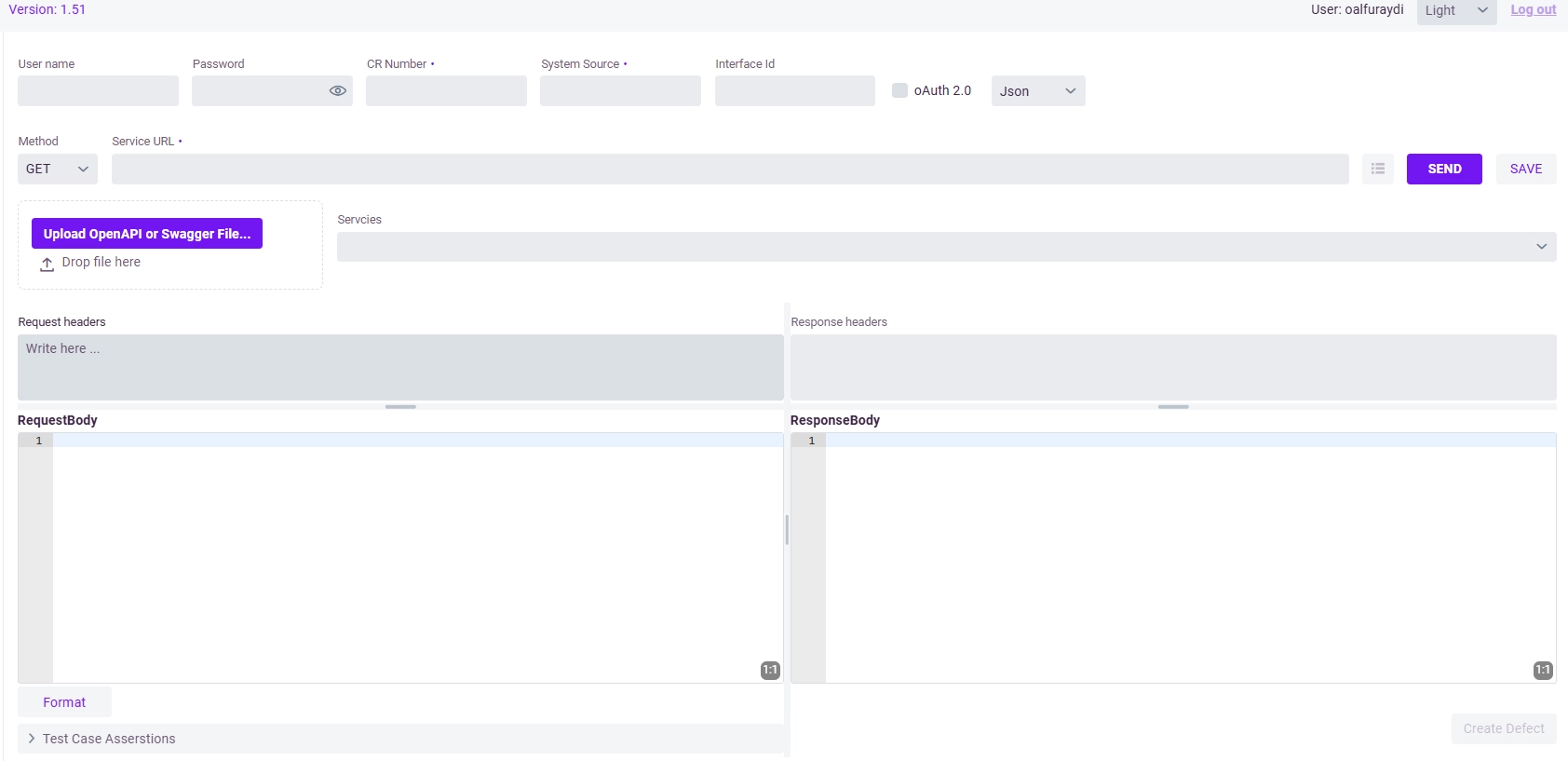
Page for invocation rest application with OpenAPI import
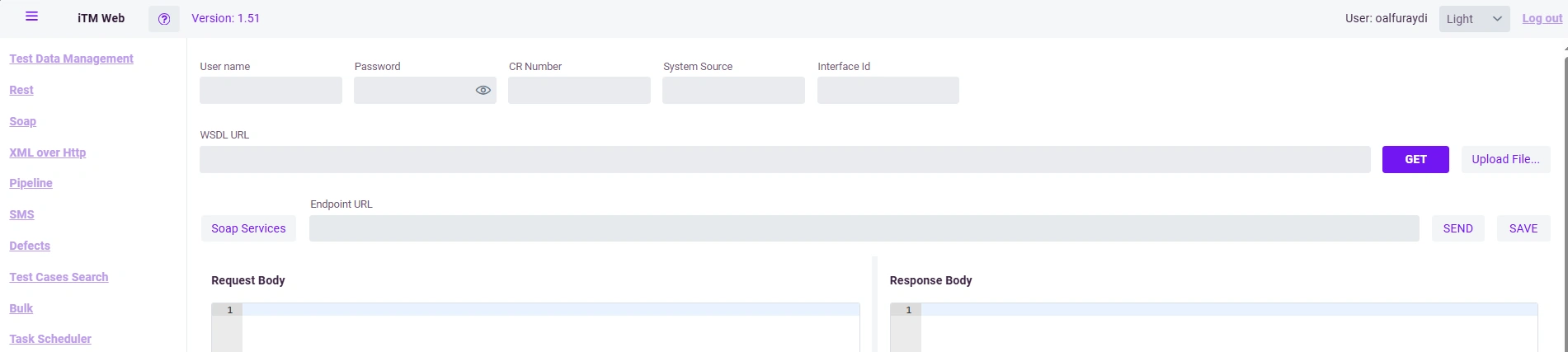
Page for invocation rest application with WSDL import through file or URI
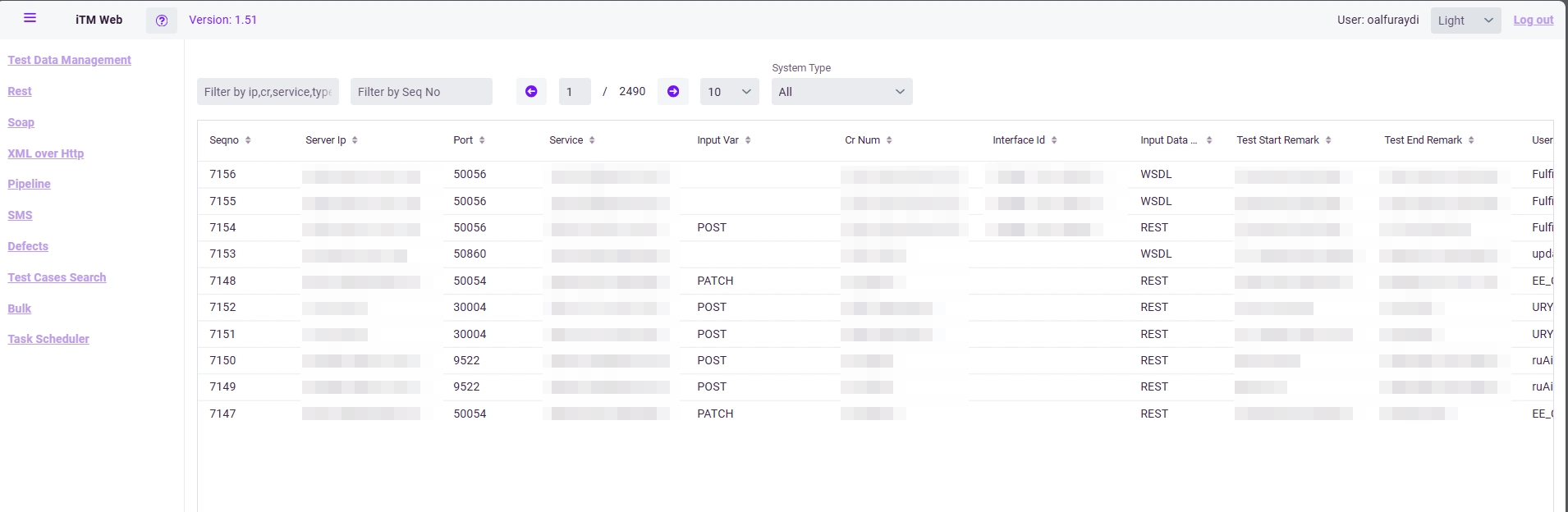
Test cases page.
I contributed to the tool by fixing bugs and adding several new features.
While using a proxy server was an option, I felt that neither the Operations nor Cybersecurity teams would be comfortable with a proxy having access to the test or pre-production environments. A lightweight HTTP server seemed like a safer and more acceptable solution. Lets build a simple demo.
My Approach
The approach is simple, we have the Http client that sits on a server that we have access to. Build a UI to facilitate the Client. I'm only going to add an interface for invoking REST applications. Add a database for saving testcases.
I will use Quarkus server and JDK11 Http Client, Qute -a template engine- and htmx for frontend.
As long as the Client reside in a server that is accessible by to us and what other server we don’t access to , we can test to our hearts content. this is how we bypass operation and cybersecurity overgrowing restrictions. Or you could split the client and frontend into two different services.

Html Pages
First lets build the Html pages.
We start with the rest Form which will trigger the the request using htmx hx-post. as seen in the button tag. additionally in the form we indicate that the target is an html element of id output hx-target="#output". So we are expect the result to be handled in that tag.
We are adding placeholders for request in case this page was loaded from saved testcase. The request tag are data binding that qute can inject in the template before rendering the html.
<form  hx-target="#output"
    hx-indicator="#progress-bar"
    hx-include="this"
    id="mainform" >
    <label>Collection:</label>
    <input type="text" name="collection" value="{request.collection}">
    <label>URL:</label>
    <input type="url" name="url" required value="{request.url}">
    <label>HTTP Method:</label>
    <select name="method" >
        <option {Verb:GET == request.verb ? 'selected' : '' }>GET</option>
        <option {Verb:POST == request.verb ? 'selected' : '' }>POST</option>
        <option {Verb:PUT == request.verb ? 'selected' : '' }>PUT</option>
        <option {Verb:DELETE == request.verb ? 'selected' : '' }>DELETE</option>
        <option {Verb:PATCH == request.verb ? 'selected' : '' }>PATCH</option>
    </select>
    <label>Username (Basic Auth):</label>
    <input type="text" name="userName" value="{request.userName}">
    <label>Password (Basic Auth):</label>
    <input type="password" name="password" value="{request.password}">
    <label>Request Headers (JSON):</label>
    <textarea name="headers" rows="5"  placeholder='Content-Type": application/json'>{request.requestHeader}</textarea>
    <label>Request Body:</label>
    <textarea name="body" rows="10"  placeholder='key: "value' >{request.request}</textarea>
    <button hx-post="/rest/send-request" type="submit"  hx-include="closest form">Send Request</button>

</div>
We are done with the input form lets continue with output section. Output div will accept a fragment which are partial template that can be injected without refreshing the whole page. similarly we are using qute data to binds the response as well.
We also add save button that uses htmx hx-include to inlude all data from two main div that are need for htmx hx-post="/rest/save-request" request
 <div class="output" id="output">
        {#fragment id=request_output}
         <h2>Response</h2>
        <label>Status:</label>
        <textarea name="status" rows="1" >{request.status}</textarea>
        <label>Response Headers:</label>
        <textarea name="responseHeader" >{request.responseHeader}</textarea>
        <label>Response Body:</label>
        <textarea name="response">{request.response}</textarea>
         <button type="submit" hx-post="/rest/save-request" hx-target="#saveresponse" hx-include="#mainform , #output">Save Request</button>
          <div id="saveresponse"></div>
        {/fragment}
        </form>
    </div>
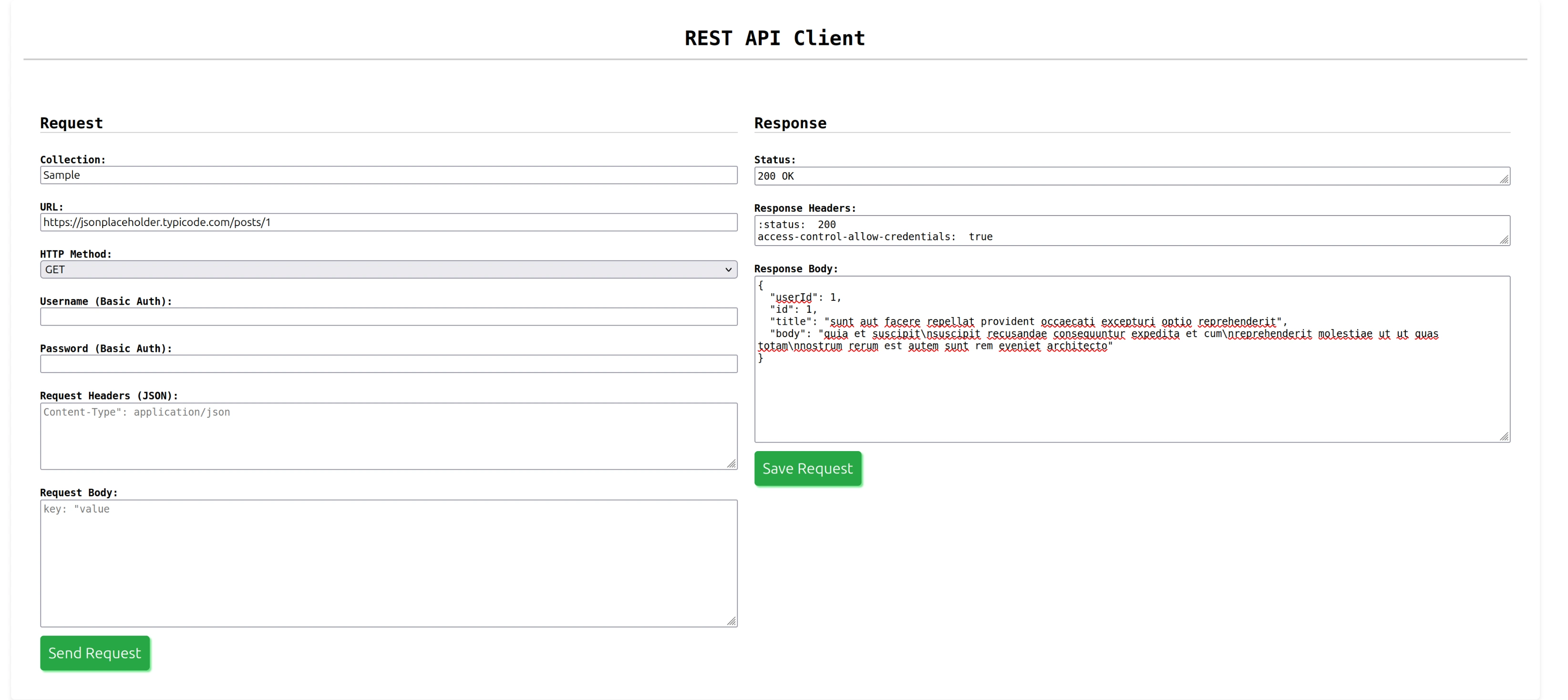
This is the final result.
Back end
lets build our entity for rest.
@Entity
public class RestRequest extends PanacheEntity {

    public Verb verb;0)
    public String request;
    public String response;
    public String requestHeader;
    public String responseHeader;
    public String url;
    public String userName;
    public String password;
    public String status;
    public String collection;
Qute template are easily loaded. We create Rest endpoint that defines the template. The template is inject using @Inject
We created two new endpoints one for new testcase or saved one using loaded using path parameter id.
Path("/rest")
public class RestPage {

    @Inject
    Template rest;
    @Inject
    RestController restController;

    @GET
    @Produces(MediaType.TEXT_HTML)
    public TemplateInstance getRest() {

        return rest
                .data("request", new RestRequest());
    }

    @Blocking
    @RunOnVirtualThread
    @Path("{id}")
    @GET
    @Produces(MediaType.TEXT_HTML)
    public Object getResttestcasebyId(@PathParam(value = "id") long id) {
        RestRequest request=RestRequest.findById(id);
        if(request==null){
             return Response.status(404).build();
        }
        return rest
                .data("request", request);
    }
   @Path("send-request")
    @POST
    @Consumes(MediaType.APPLICATION_FORM_URLENCODED)
    public String sendRest(@RestForm String url, @RestForm String method, @RestForm String userName,
            @RestForm String password, @RestForm String headers, @RestForm String body) {
        RestRequest requestEntity = new RestRequest(Verb.valueOf(method), body, headers, url, userName, password);
        requestEntity = restController.invokeRest(requestEntity);
        return rest.getFragment("request_output")
                .data("request", requestEntity)
                .render();
    }
Here the request is sent using the form we created the result is stored in our request object and returned back to the page as a template fragment to be swappedby htmx. you can read about template fragment here. Template Fragments
The rest is simple. JDK11 http client is easy to use. only we need to do is format the headers
    HttpClient client = HttpClient.newHttpClient();
    static String regex = "(\n)|(:\s)";
        HttpRequest httpRequest = HttpRequest.newBuilder()
                .uri(URI.create(requestEntity.url))
                .timeout(Duration.ofMinutes(1))
                .method(requestEntity.verb.name(), HttpRequest.BodyPublishers.ofString(requestEntity.request))
                .headers(requestEntity.requestHeader.split(regex))
                .build();
        if (!requestEntity.userName.isEmpty() && !requestEntity.password.isEmpty()) {
            String basicauth = requestEntity.userName + ":" + requestEntity.password;
            String encodeToString = Base64.getEncoder().withoutPadding().encodeToString(basicauth.getBytes());
            httpRequest = HttpRequest.newBuilder(httpRequest, (n, v) -> true).header("Authorization", "Basic "+encodeToString)
                .build();
        }
        HttpResponse<String> sent = client.send(httpRequest, BodyHandlers.ofString());
Test Cases Page
Only thing left is the test cases page with simple testing case load using testcase Id and a delete button.
I am using qute template to fill the table. and htmx for delete actions.
<body>
    <h1>REST API Client - TestCases</h1>
    <div class="main">
        <table border="1" width="100%" cellspacing="1" cellpadding="5">
            <thead>
                <tr>
                    <th>Collection</th>
                    <th>Verb</th>
                    <th>Uri</th>
                    <th>Status</th>
                    <th>Request</th>
                    <th>Load</th>
                    <th>Delete</th>
                </tr>
            </thead>
            <tbody>
                {#for request in requests}
                <tr>
                    <td>{request.collection}</td>
                    <td>{request.verb}</td>
                    <td>{request.url}</td>
                    <td>{request.status}</td>
                    <td>{request.request}</td>
                    <td><a href="/rest/{request.id}"><button>Load</button></a></td>
                    <td><button hx-confirm="Are you sure want to delete The testcase id:{request.id}"
                            hx-delete="/testcases/{request.id}" class="deleteButton" hx-target="closest tr"
                            hx-swap="outerHTML swap:1s">Delete</button></td>
                </tr>
                {/for}
            </tbody>
        </table>

    </div>
</body>
@Path("/testcases")
public class TestCasePage {

    @Inject
    Template testcases;
    @Inject
    RestController restController;

    @Blocking
    @RunOnVirtualThread
    @GET
    @Produces(MediaType.TEXT_HTML)
    public TemplateInstance testcases() {
        return testcases
                .data("requests", restController.getAllRequests());
    }

    @Blocking
    @RunOnVirtualThread
    @Path("{id}")
    @DELETE
    public void deleteResttestcasebyId(@PathParam(value = "id") long id) {
          restController.deleteRestRequestById(id);
    }

}

This is a small demonstration.
I plan to add error handling and validation in the future. Please refer to the full code here. web-restclient
Thank you for reading.